An All-in-one
Advanced School Management System.
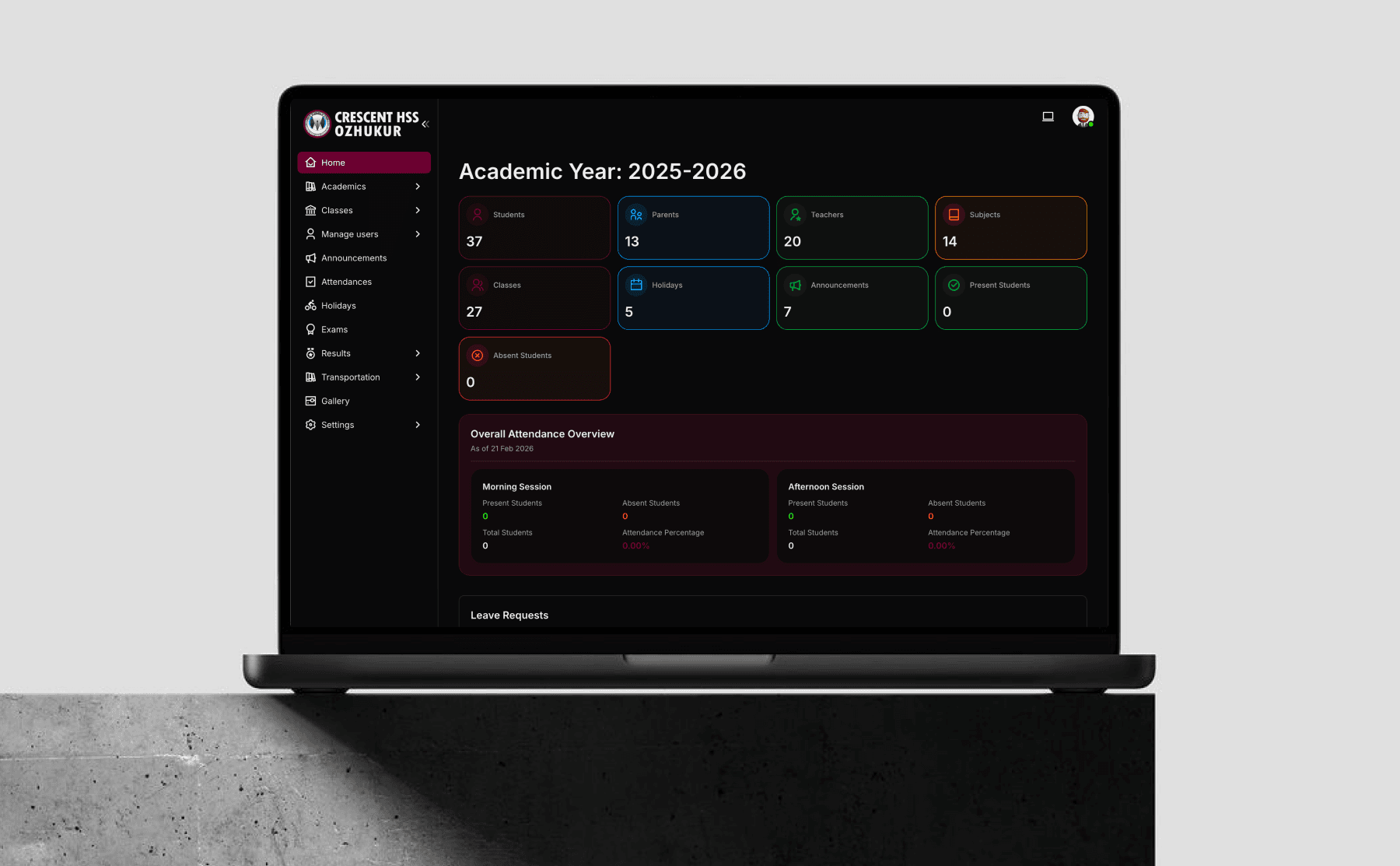
Adox Arabia provides Class Nex, a comprehensive school management solution designed to streamline academic and administrative tasks. Enhance communication, manage data efficiently, and improve institutional productivity.

Advanced School Management System
Operational Areas
It's an all-in-one school management tool with, which, authorized one can access and manage all functions that took place in a Institution. it can be used for following...
OUR FEATURES
"Our AI-integrated School Management System empowers leaders with real-time insights and predictive intelligence to drive better academic and operational outcomes."
SPECIALLY DESIGNED PARENTS APP,
STUDENTS APP & TEACHERS APP
We are a software company specializing in developing websites and applications. We create customized Parents Applications and Students Applications under the school's name, tailored to meet the specific requirements of the school.
These applications are developed without any initial cost, ensuring a seamless and cost-effective solution for educational institutions.
ABOUT US
Class Nex is an international EdTech product redefining how schools operate in the digital era. For over 8 years, we have empowered educational institutions with intelligent, efficient, and easy-to-use management solutions.
Our innovative platform streamlines administration, strengthens communication, and enhances overall operational performance — enabling schools to focus more on education and less on complexity.
We believe every institution is unique. That's why we work closely with schools to deliver fully customized solutions tailored to their specific goals and requirements.
Smarter Management.
Better Education.
ENQUIRY MANAGEMENT
Enquiry Capture
Collect inquiries via forms, emails, or calls seamlessly.
Enquiry Follow-up
Automated reminders for timely communication.
Enquiry Status Tracking
Monitor progress from inquiry to admission in real-time.
Integration
Sync leads with CRM and marketing tools effortlessly.
Task Assignment
Allocate leads to specific team members for focused attention.
Communication History
Maintain logs of calls, emails, and interactions.
ADMISSION DESK MANAGEMENT
Inquiry Handling
Manage walk-in, call, and online inquiries efficiently.
Document Management
Collect, verify, and store admission documents digitally.
Application Tracking
Monitor application status from submission to approval.
Fee Payment Integration
Enable on-the-spot fee collection and receipt generation.
Appointment Scheduling
Schedule and manage parent-staff meetings effortlessly.
Data Centralization
Store all applicant information securely in one place.
STUDENT MANAGEMENT
Student Profiles & Document Storage
Maintain detailed records, including personal, academic, and medical data.
Attendance Tracking
Monitor daily attendance with biometric or manual options.
Grade book Management
Record and analyze student performance across subjects.
Behavior Monitoring
Track and report disciplinary actions and achievements.
Extracurricular Activities
Manage participation in sports, clubs, and events.
Fee Management
Monitor fee dues, generate invoices, and track payments.
Promotions & Transfers
Automate class promotions and student transfers.
PARENTAL CONTROL OR PARENT APP
Real-time Updates
Receive instant notification on attendance grade and events
Homework Monitoring
Track assigned homework and submission deadlines.
Progress Reports
Access detailed performance and progress reports online.
Attendance Alerts
Get alerts for absences or irregular attendance.
Behavior Tracking
View disciplinary records and commendations.
Communication Portal
Connect directly with teachers and staff for inquiries.
Fee Payment Access
Monitor and pay school fees securely online using payment gateway.
Timetable Viewing
Check class schedules and upcoming assessments.
Security Integration
Monitor entry and exit times through RFID or biometric systems.
CLASS MANAGEMENT
Classroom Timetable
Create, modify, and manage class schedules seamlessly.
Student Allocation
Assign students to classes and sections efficiently.
Attendance Management
Record and monitor student attendance digitally.
Subject Allocation
Assign subjects to classes and allocate teachers.
Discipline Records
Track and manage behavioral incidents within the class.
Communication Tools
Facilitate interaction between teachers, students, and parents.
TIME TABLE MANAGEMENT SYSTEM
Customizable Timetables
Create and edit timetables to meet specific school needs.
Teacher Availability
Track and integrate teacher availability into scheduling.
Real-time Updates
Notify teachers, students, and parents of timetable changes instantly.
Subject Allocation
Assign subjects to classes and allocate teachers.
Change periods for a day
You can change the teachers or subject any time in the availability.
Printable Reports
Generate and print timetables for distribution or noticeboards.
ATTENDANCE MANAGEMENT SECTION
Automated Attendance
Use biometric or RFID systems for instant attendance recording.
Manual Attendance
Allow teachers to mark attendance manually using their mobile app when needed.
Daily Reports
Generate daily attendance summaries for classes and individuals.
Real-time Notifications
Notify parents of absences or tardiness instantly.
Leave Management
Track and manage student leave requests seamlessly.
Class-Wise Tracking
Monitor attendance for each class or section separately.
Printable Records
Export and print attendance logs for official use.
EXAMS & PROGRESS REPORT CREATION
Create Exams
Create your own exams like Term Exam, Class tests, Daily viva etc...
Upload Marks
Upload student marks using the teachers app from classroom or from their home.
Grading System
Customize grading scales based on school standards.
Result Compilation
Automate calculation of scores, averages, and rankings.
Progress Reports
Generate detailed performance reports for individual students.
Subject-Wise Analysis
Provide insights into strengths and areas for improvement.
Printable Reports
Generate and print progress cards in customizable formats.
REPORT CREATIONS
Comprehensive Report Creation
Teachers generate reports covering academic, non-academic, and disciplinary aspects.
Diary-like System
Mimics traditional diary communication for structured reporting.
Real-time Sharing
Send reports directly to parents via a Parents App.
Detailed Feedback
Include specific observations, grades, and behavior notes.
Notifications
Alert parents and teachers when a report is sent or replied to.
Enhanced Collaboration
Strengthen teacher-parent communication for student development.
HOMEWORK & ASSIGNMENT MANAGEMENT
Homework Assignment
Teachers can assign homework to students digitally.
Customizable Formats
Upload text, documents, videos, or images as part of assignments.
Submission Tracking
Monitor submission status and deadlines for each student.
Automated Reminders
Notify students and parents about upcoming deadlines.
Grading & Feedback
Evaluate submissions and provide instant feedback.
Performance Analytics
Analyze homework completion rates and student performance.
Subject-Specific Assignments
Assign tasks tailored to specific subjects or topics.
FEE MANAGEMENT
Individual Fee Assignment
Teachers can assign fees to each student based on requirements.
Customizable Concessions
Add discounts, scholarships, or special concessions for students.
Flexible Fee Structures
Support for fixed fees or subscription-based fee models.
Subscription Fee Management
Increment fees daily or monthly based on student attendance.
Multiple Payment Options
Pay fees via online payment gateway or cash at the front office.
Receipt Management
Generate and print receipts for cash payments instantly.
Digital Receipt Downloads
Parents can download fee receipts anytime from the app.
Comprehensive Reporting
Track fee payments, pending amounts, and concessions efficiently.
STUDENT WALLET
Cashless Transactions
Enables a cashless system within the school for enhanced convenience.
Parent Deposits
Parents can deposit funds into the student's wallet for internal use.
Student Purchases
Students can purchase items within the school using their wallet balance with their ID card.
Fine Deductions
The school can deduct fines or other charges directly from the student's wallet.
Transaction Transparency
Parents can view the wallet's transaction history on their application like a bank account statement.
Controlled Spending
Monitor and control student spending within the school.
Multi-purpose Usage
Use the wallet for canteen, library, store, mess, or any other institutional expenses.
DEPOSIT & REFUND SYSTEM
Deposit Collection
Collect deposits from parents for academic, hostel, and transportation purposes.
Fine Deduction
Deduct fines for damages or disciplinary actions from the respective deposit.
Fee Adjustment
Transfer deposit amounts to fee sections if parents miss monthly or term payments.
Real-time Tracking
Monitor deductions and remaining balances in the deposit account.
Refund Calculation
Calculate the refundable amount when a student applies for a Transfer Certificate (TC).
Explore
INVENTORY SYSTEM
Homework Assignment
Teachers can assign homework to students digitally.
Customizable Formats
Upload text, documents, videos, or images as part of assignments.
Submission Tracking
Monitor submission status and deadlines for each student.
Automated Reminders
Notify students and parents about upcoming deadlines.
Grading & Feedback
Evaluate submissions and provide instant feedback.
Performance Analytics
Analyze homework completion rates and student performance.
MEDICAL MANAGEMENT
Individual Fee Assignment
Teachers can assign fees to each student based on requirements.
Customizable Concessions
Add discounts, scholarships, or special concessions for students.
Flexible Fee Structures
Support for fixed fees or subscription-based fee models.
Subscription Fee Management
Increment fees daily or monthly based on student attendance.
Multiple Payment Options
Pay fees via online payment gateway or cash at the front office.
SICK ROOM MANAGEMENT SYSTEM
Cashless Transactions
Enables a cashless system within the school for enhanced convenience.
Parent Deposits
Parents can deposit funds into the student's wallet for internal use.
Student Purchases
Students can purchase items within the school using their wallet balance with their ID card.
Fine Deductions
The school can deduct fines or other charges directly from the student's wallet.
Transaction Transparency
Parents can view the wallet's transaction history on their application like a bank account statement.
Controlled Spending
Monitor and control student spending within the school.
Multi-purpose Usage
Use the wallet for canteen, library, store, mess, or any other institutional expenses.
Multi-purpose Usage
Use the wallet for canteen, library, store, mess, or any other
TRANSPORTATION MANAGEMENT SYSTEM
Deposit Collection
Collect deposits from parents for academic, hostel, and transportation purposes.
Fine Deduction
Deduct fines for damages or disciplinary actions from the respective deposit.
Fee Adjustment
Transfer deposit amounts to fee sections if parents miss monthly or term payments.
Real-time Tracking
Monitor deductions and remaining balances in the deposit account.
Refund Calculation
Calculate the refundable amount when a student applies for a Transfer Certificate (TC).
Refund Calculation
Calculate the refundable amount when a student applies for a Transfer Certificate (TC).
Refund Calculation
Calculate the refundable amount when a student applies for a Transfer Certificate (TC).
Refund Calculation
Calculate the refundable amount when a student applies for a Transfer Certificate (TC).
ASSET MANAGEMENT
Cashless Transactions
Enables a cashless system within the school for enhanced convenience.
Parent Deposits
Parents can deposit funds into the student's wallet for internal use.
Student Purchases
Students can purchase items within the school using their wallet balance with their ID card.
Fine Deductions
The school can deduct fines or other charges directly from the student's wallet.
Transaction Transparency
Parents can view the wallet's transaction history on their application like a bank account statement.
Controlled Spending
Monitor and control student spending within the school.
SMART CARD INTEGRATION
Deposit Collection
Collect deposits from parents for academic, hostel, and transportation purposes.
Fine Deduction
Deduct fines for damages or disciplinary actions from the respective deposit.
Fee Adjustment
Transfer deposit amounts to fee sections if parents miss monthly or term payments.
Real-time Tracking
Monitor deductions and remaining balances in the deposit account.
Refund Calculation
Calculate the refundable amount when a student applies for a Transfer Certificate (TC).
VISITORS MANAGEMENT SYSTEM
Visitor Pass Creation
Teachers, administrators, and parents can create visitor passes through their respective apps.
Security App Integration
Security personnel receive real-time notifications of visitor passes on their app.
Parent Visitor Section
Parents can create visitor passes via their parent app for pre-approved campus visits.
Approval Workflow
Teachers or administrators can approve or reject visitor passes instantly.
Gate Entry Verification
Security can verify visitor details and pass status before allowing entry.
New Visitor Registration
Security can register new visitors directly at the gate through their app.
Visitor Logs
Maintain a detailed record of all visitors, including entry and exit times.
Enhanced Security
Ensure campus safety by tracking all visitor activities and maintaining strict entry protocols.
LEAVE & GATE PASS
Leave Letter Submission
Parents can submit leave letters for their child using the parent app.
Approval Workflow
Teachers or concerned authorities can approve, edit, or reject leave letters based on school policies.
Notification System
Parents receive real-time notifications on the status of leave letters.
Automatic Gate Pass Creation
Approved leave letters automatically generate a gate pass for the student.
Late Return Reporting
If a student returns late, the system notifies the gate pass approver for follow-up.
Real-time Monitoring
Authorities can track gate pass usage and monitor student movements.
Emergency Situations
Allow rapid gate pass creation for urgent situations like medical emergencies.
History Logs
Maintain detailed logs of all leave letters and gate passes for record-keeping.
Enhanced Security
Ensure safe and controlled student movements within and outside the campus.
PAYROLL MANAGEMENT
Employee Data Management
Maintain comprehensive records of employee details, designations, and salaries.
Salary Structure Customization
Create and manage salary components such as Monthly, Daily, or Hourly bases.
Attendance Integration
Automate payroll calculations based on employee attendance and leave records.
Automated Payroll Processing
Generate monthly payrolls with accurate calculations and minimal effort.
Payslip Generation
Provide employees with digital or printed payslips, accessible through their portal.
Overtime and Bonuses
Add overtime pay, bonuses, or incentives to employee salaries easily.
Custom Reports
Generate payroll reports, tax summaries, and salary disbursement records.
Leave and Advance Adjustments
Adjust salaries for unpaid leave or salary advances taken by employees.
ACCOUNTS MANAGEMENT
Income and Expense Tracking
Add income and expense entries directly through the user section.
Integrated Sections
Link fees, payroll, student wallets, deposits, and refunds with the accounts section.
Simplified Accounting
Designed for easy understanding, not complex like traditional accounting software.
Profit and Loss Analysis
Generate quick profit and loss summaries for financial review.
Custom Reports
Create simple, clear reports for meetings or management discussions.
Expense Categorization
Organize expenses under categories like maintenance, utilities, or purchases.
Income Sources
Record and analyze income from fees, donations, or other channels.
Monthly Summaries
Generate monthly or periodic summaries of income and expenses.
Printable Reports
Export or print account summaries for presentations or compliance purposes.
Cost-Effective Solution
TICKET GENERATING SYSTEM
Purpose
Streamlines inter-departmental communication and problem resolution within the institution.
Ticket Generation
Users (students, parents, or staff) can raise tickets for issues or approvals. Each ticket includes the reason and required actions.
Departmental Workflow
Tickets are automatically sent to the relevant department. Departments can respond to the ticket or escalate it to another department, admin, or super admin.
Real-Time Updates
Users can track ticket progress, including responses and actions taken by departments. Departments and admins can monitor ticket flow and resolution status.
Process Transparency
Displays the complete ticket lifecycle: submitted, viewed, processed, and resolved. Ensures accountability by tracking the number of processes completed and departments involved.
Multi-Level Access
Students, parents, and staff can use the system to generate tickets via the application. Super admins have full visibility and control over all ticket activities.
Efficiency in Resolution
Reduces manual communication delays and promotes faster problem-solving. Ensures all parties are informed about ticket status and outcomes.
Reporting and Analysis
Detailed reports on ticket resolution times, pending issues, and departmental efficiency. Provides insights for improving institutional processes.
PAYMENT GATEWAY INTEGRATION
Online Payments
Students and parents can pay online through credit/debit cards, cash cards, or internet banking using the parents' app.
Third-Party Integration
We can integrate a third-party or bank payment gateway as soon as possible.
DIFFERENT LOGIN PANELS & USER RIGHTS MANAGEMENT
Role-Based Login Panels
Provide separate login panels for administrators, teachers, parents, students, and other staff.
Administrator Control
Admins can manage system settings, assign roles, and monitor all activities.
Access Restrictions
Limit access to sensitive data based on user roles.
Scalable System
Add or modify roles and rights as the institution grows or policies change.
STUDENT ATTENDANCE DEVICE INSTALLATION
Device Setup
Stall the attendance device in a designated area (classroom entrance).
Connectivity
Connect the device to power and ensure it's linked to the school's network.
User Registration
Register students on the device by inputting their details (name, ID number, etc.).
Biometric Data
Optionally, use biometric data (fingerprints or facial recognition) for identification.

Class Nex
SCHOOL MANAGEMENT SYSTEM
Run Your School on Intelligence.
Where Technology Meets Education.
Simplify Operations. Amplify Excellence.